Android app · Made in Switzerland

The garden planner app that checks the weather

Beetario is a garden planner app for beds, balconies and houseplants. It tells you when to water and when not to, warns you of frost, plans your beds with companion planting and identifies plants from a photo. Buy once instead of a subscription, no account, your data stays on your phone.

Coming soon to Google PlayHow it works

Free to use · No account · No ads

How it works

Three steps, then the app does the remembering. No sign-up, no account.

  1. Set up your garden

    Enter a place or postcode, then add spots: room, balcony, bed, raised bed or pot. That way the app knows the weather, frost dates, light and soil.

  2. Add plants

    Identify by photo or search the catalogue of over 8,000 species. More than 300 of them have a plant card with sourced details such as light, water and toxicity.

  3. Check «Today»

    The «Today» page shows watering, tasks and frost warnings. Tap «Watered» or «Not needed», and the watering plan learns from it.

What the garden planner app does

Six jobs Beetario takes off your hands through the gardening year. The pictures are screenshots from the app with a sample garden.

Identify plants from a photo

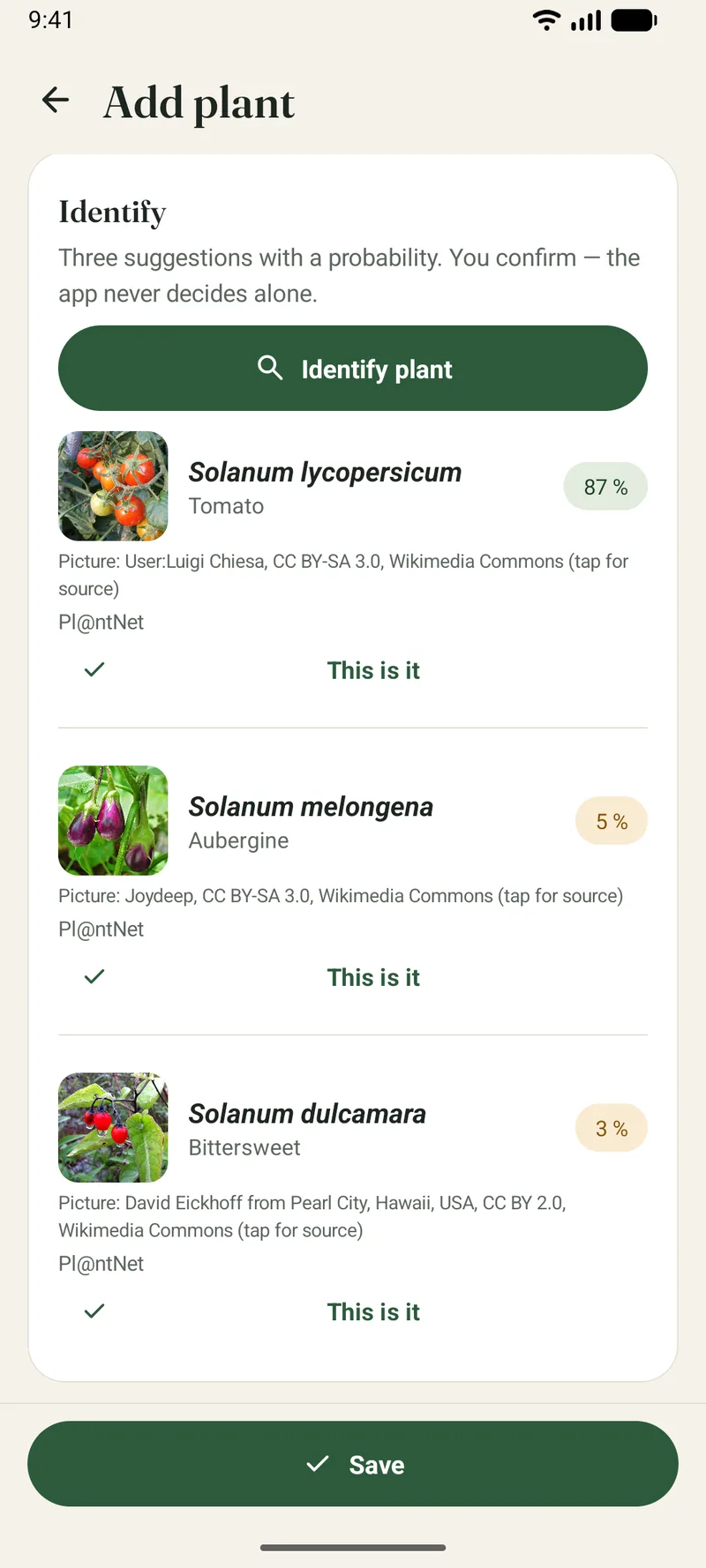
Not sure what is growing in your bed? Take a photo of a leaf or flower. Identification is done by Pl@ntNet, a project of French research institutes. You get three suggestions with a match score and decide for yourself which one is right.

If none fits, pick the plant from the catalogue or add it by hand. The photo is sent without location data, and identification only runs after you consent. You can identify up to five plants a day.

Garden planner app Beetario: identifying a plant from a photo, three Pl@ntNet suggestions with match score
Take a photo, identify the plant: three suggestions, you confirm.

A watering plan with weather: sometimes «no need»

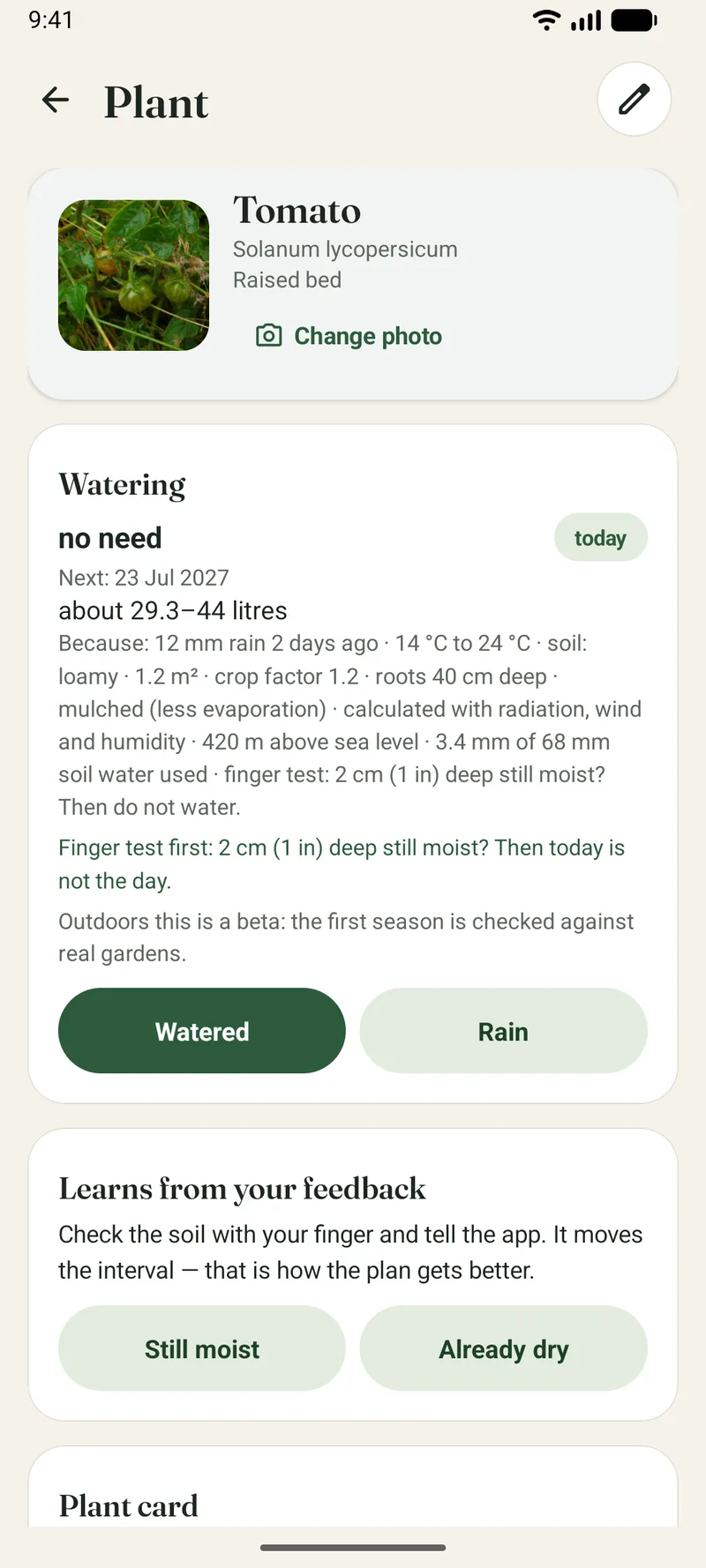
The watering plan is the heart of the app. Outdoors it keeps a water balance: rain and evaporation from the MET Norway forecast, plus the soil and the plant's root depth. If 12 mm of rain fell two days ago, it says: no need. The calculation is right below, so you can follow it.

Indoors the watering plan starts from the plant card and adjusts for season, light and pot. Tap «Still moist» or «Already dry» to correct it, and it learns. The amount is shown as a range, not a falsely precise figure. Numbers always come from the calculation, never from the AI. For outdoor beds the watering plan is marked beta in its first season.

Watering plan in Beetario: tomato in a raised bed, no need to water today after 12 mm of rain, calculation below
No need to water today: 12 mm of rain two days ago.

Frost warnings for outdoor plants

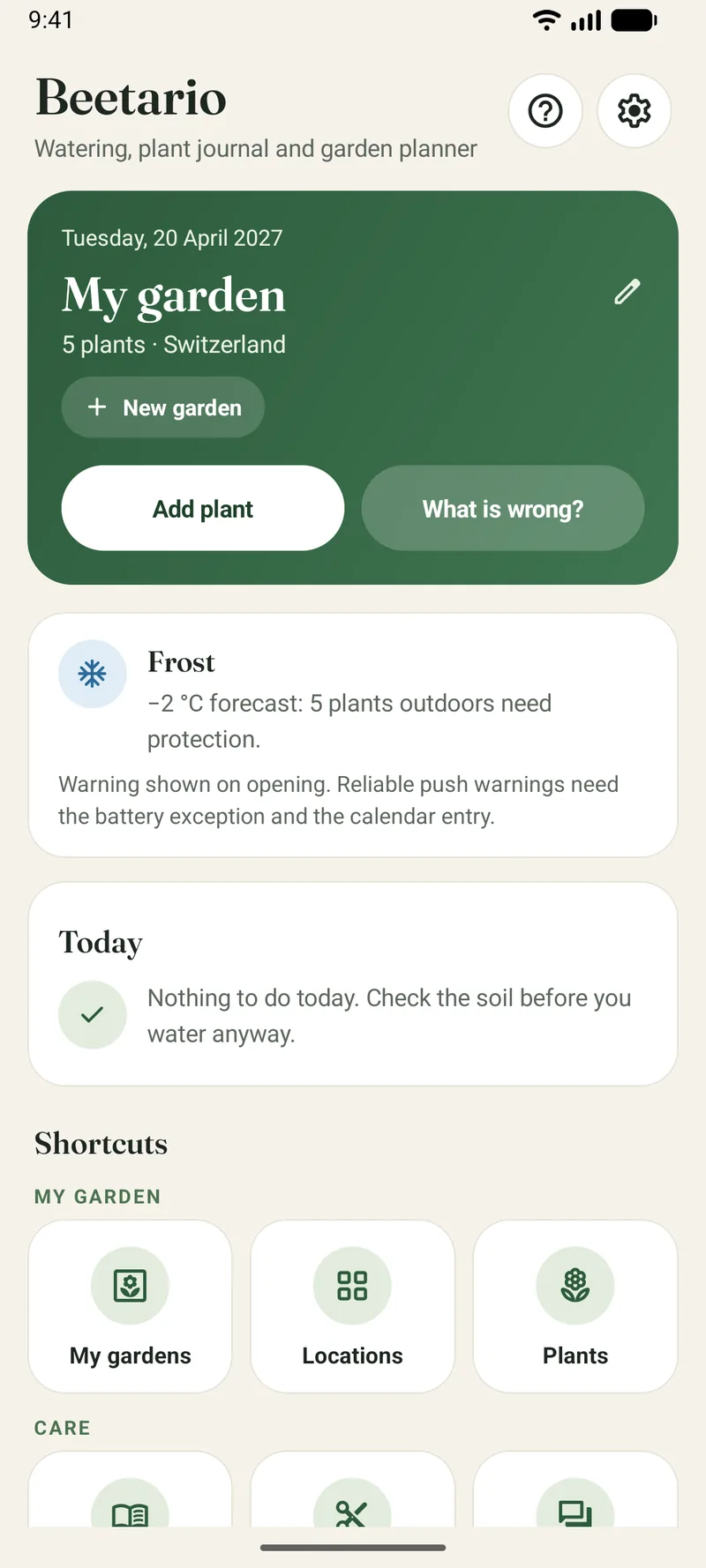
When a cold night is coming, Beetario shows a frost warning when you open it: how cold it will get and how many of your outdoor plants need protection. The app knows from your garden what is outside. It warns you about heat as well.

It can work out your garden's frost dates from climate data for your location, or you enter your own. Sowing and harvest times on the plant cards move with them. To get the warning as a notification while the app is closed, allow the battery exception once.

Frost warning in the garden app: minus 2 degrees forecast, 5 outdoor plants need protection
Frost ahead: −2 °C, 5 outdoor plants need protection.

Bed planner with companion planting and crop rotation

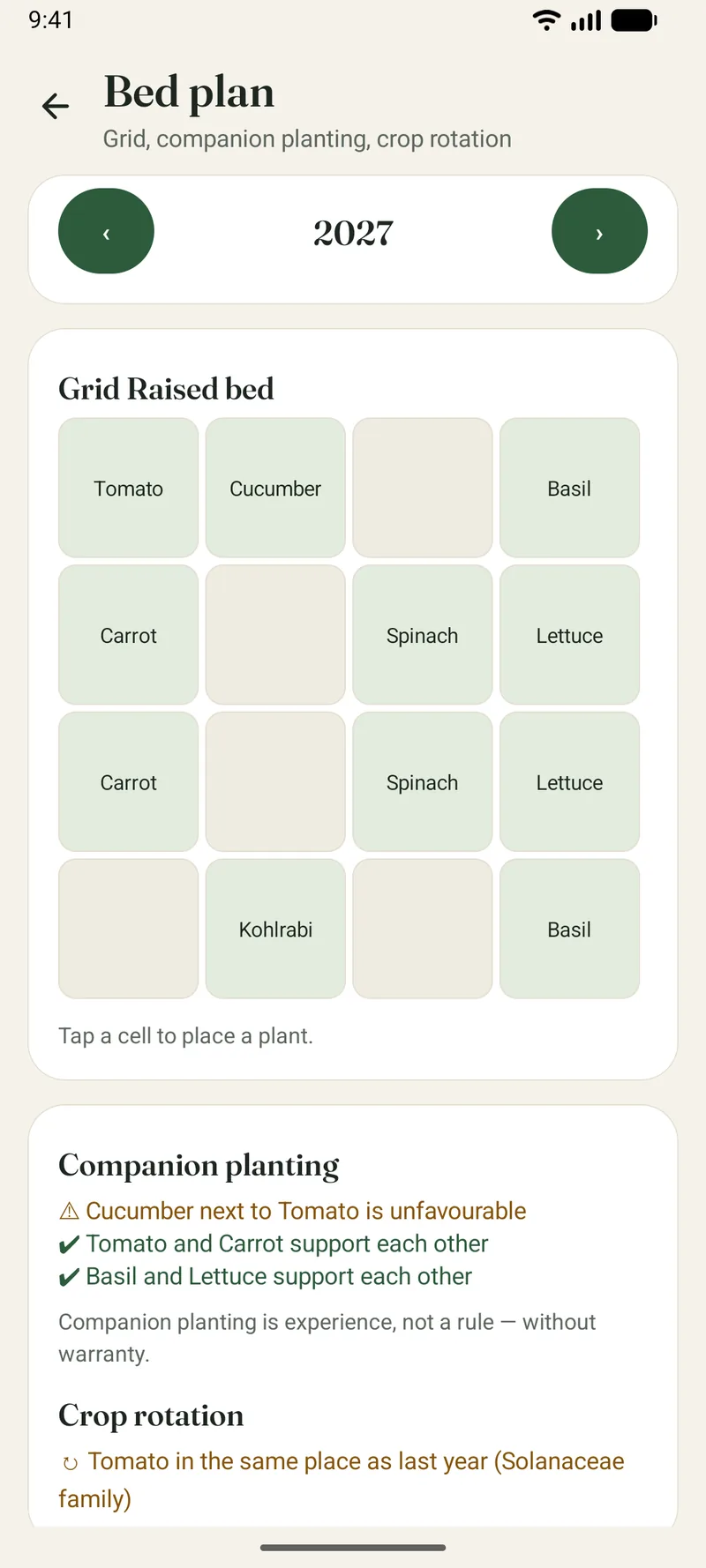
In the bed planner you lay out a raised bed, vegetable patch or window box as a grid and place your plants. Below it, companion planting shows which neighbours support each other and which are unfavourable. Companion planting is experience, not a rule, so it says «without warranty».

For next year you switch to 2027 and reuse the old plan as a template. If the same plant family ends up in the same spot again, the bed planner flags it as a crop rotation hint. As a PDF, the plan can hang in the shed.

Beetario bed planner: raised bed as a grid with companion planting and crop rotation hints
Bed plan with companion planting: good and unfavourable neighbours at a glance.

Ask questions, get answers with sources

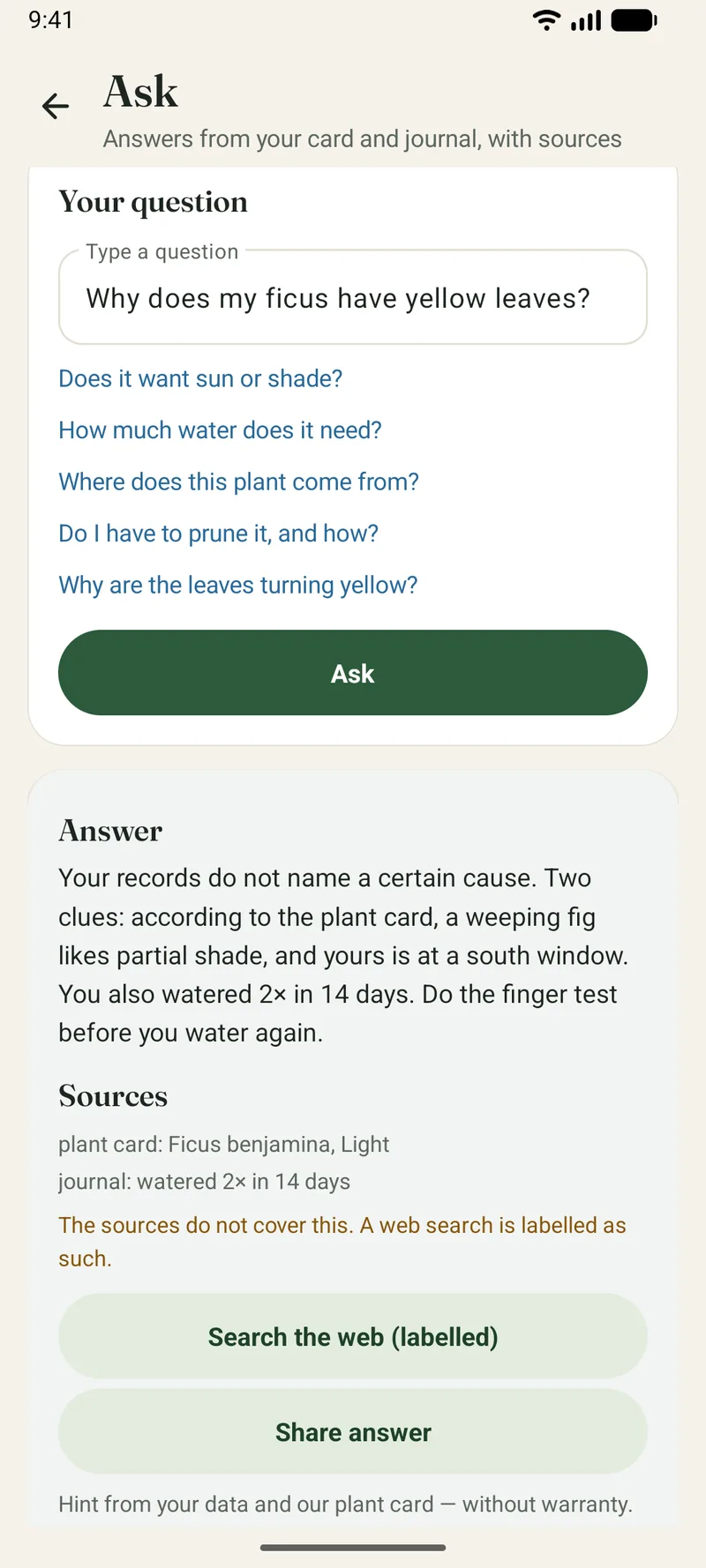
Why does my ficus have yellow leaves? Beetario answers questions like this with what you have already saved: plant card, spot, the last 30 days of the journal and the weather. Every answer shows what it is based on, for example «Plant card: Ficus benjamina, light» and «Journal: watered 2× in 14 days».

If that is not enough, you can start a web search, and it is labelled as such. Answers come from Google Gemini and only run after you consent. Beetario does not recommend sprays; for treatment, ask a garden centre.

Beetario answer about yellow leaves on a ficus, with sources from the plant card and the journal
Answers with sources: what the plant card says, right next to it.

Holiday cover as a PDF

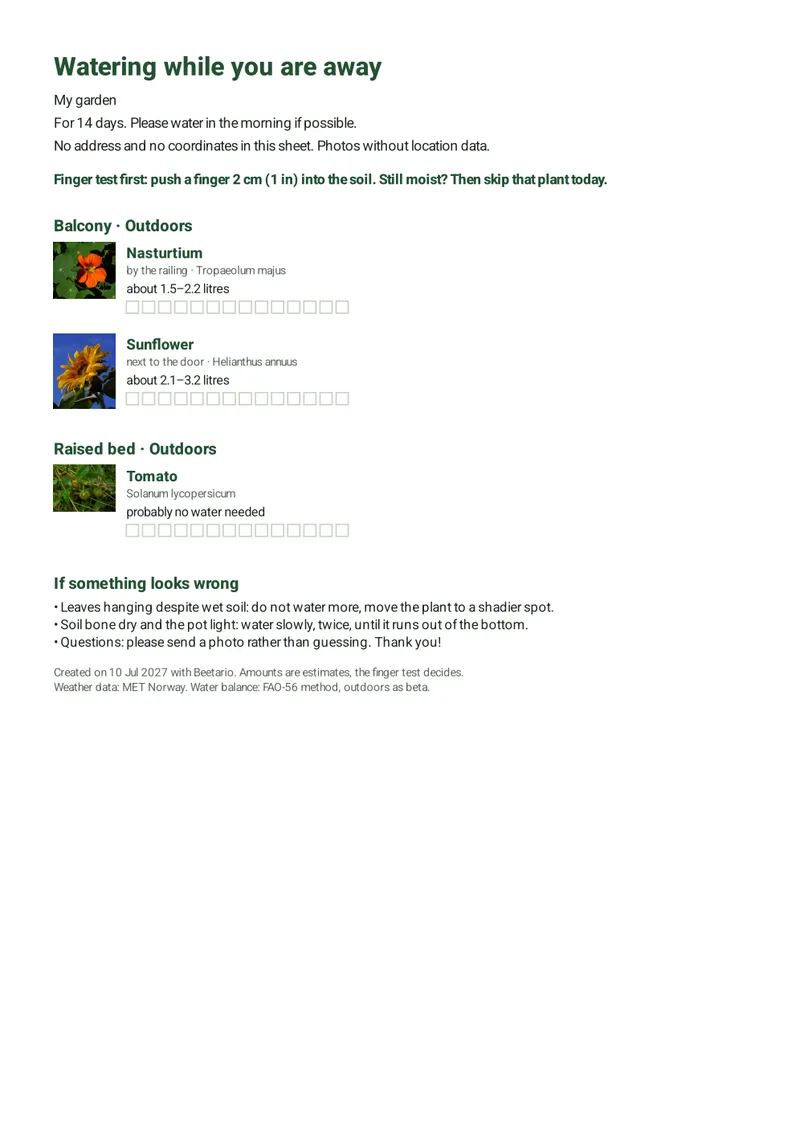
Before the summer holidays you create a PDF for whoever waters for you: spot by spot, every plant with a photo, where it stands in words, the amount such as «about 1.5–2.2 litres» and boxes to tick off for each day. The finger test is explained at the top.

No address and no GPS on it. Email the PDF or print it, and your plants get through the holidays in good shape.

Holiday cover as a PDF: watering list with photo, spot, amount in litres and boxes to tick off
Holiday cover as a PDF: photo, location, amount, boxes to tick off.

Also in the garden app

  • Over 300 plant cards with sources

    Light, water, soil, toxicity and origin: every detail names its source. You fetch new cards in the settings, without an app update.

  • Garden journal

    Photos, notes, harvest and costs per plant, plus tasks and reminders. The garden year is available as a PDF.

  • Pruning module

    25 pruning groups with dates for your garden, so roses, hydrangeas and lavender are cut at the right time.

  • Photo diagnosis

    Spots, yellow leaves or bite marks: up to three possible causes, clearly marked as possibilities, with no spray recommendation.

  • Several gardens

    Keep your flat, allotment and holiday home apart. Every page shows which garden you are in.

  • Export and moving phones

    Backup as a ZIP with all photos, export as CSV and PDF. With Pro, optional sync through your own Google Drive.

Your garden stays on your phone.

Beetario has no account and no cloud of its own for your garden data. Plants, photos, journal and beds stay on the device. Only what a feature you are using needs leaves it.

  • No account, no ads, no tracking
  • Identification and AI answers only after you consent
  • For the weather, only coordinates rounded to about 1 km, never your address

Read the privacy policy

Start free, buy once

The free tier has no plant limit. Pro is a one-time purchase, no subscription. AI-Plus is optional, for anyone who asks a lot of questions.

  • Free

    • All plants, no limit
    • Plant cards, journal and reminders
    • Interval-based watering plan
    • 10 AI questions to try
  • AI-Plus

    Yearly, optional

    • 100 AI questions and photo diagnoses a month
    • Web search included
    • Cancel any time

The price shown in Google Play in your currency applies. Purchases can be restored on a new phone.

Questions about the garden planner app

Is the garden planner app free?

Yes. The free tier has no plant limit and no ads: plant cards, journal, reminders and the interval-based watering plan. Pro is a one-time purchase and unlocks the watering plan with weather, the frost warning, the bed planner for all beds, the pruning module and the PDF exports.

How does Beetario know when I need to water?

Outdoors from a water balance with rain and evaporation from the forecast, the soil and the root depth. Indoors from the plant card, adjusted for season, light and pot. Your feedback «still moist» and «already dry» makes the watering plan more accurate.

Do I need an account?

No. Open the app and get started. If you use several devices, Pro can sync through your own Google Drive; the files are then in your Drive, not with us.

Which phones does Beetario run on?

Android 8.0 or newer. There is currently no iPhone version.

Can I use °F and inches?

Yes. Under Settings, Display you choose metric or US units and a light or dark theme. The app always calculates in metric and only converts for display.

Why doesn't Beetario recommend sprays?

Plant protection products are regulated differently in every country. Beetario names possible causes and signs, but no products and no amounts. For treatment, ask a garden centre or your regional plant protection service.

How do I move to a new phone?

On the old phone, create a backup file under Backup, copy it to the new one and choose «Restore» there. With Pro, the Google Drive sync does this for you.
Ready for the next gardening season?

Beetario is an app for Android. The garden planner app is free to use, with no account and no ads. Questions and ideas to hello@beetario.ch.

Coming soon to Google Play